How to pay suppliers by paybill, till and bank, with the name checked
A practical guide to paying suppliers and vendors in Kenya: paybill, till and bank payouts from one place, name checks first, and a record for every invoice.
FinoQ Team
Paying suppliers sounds simple. You have an invoice, the supplier has a paybill, till or bank account, and you send the money.
In practice, the problems are small and expensive:
- A paybill account number typed wrong, so the money sits in someone else’s account.
- A supplier who “changed their till” by WhatsApp message, and it was not them.
- Five invoices paid this week, and nobody can tell which payment settled which invoice.
- A distributor who says they were never paid, and your only proof is a screenshot.
Here is how to pay suppliers from FinoQ so each of those goes away.
Paying one supplier
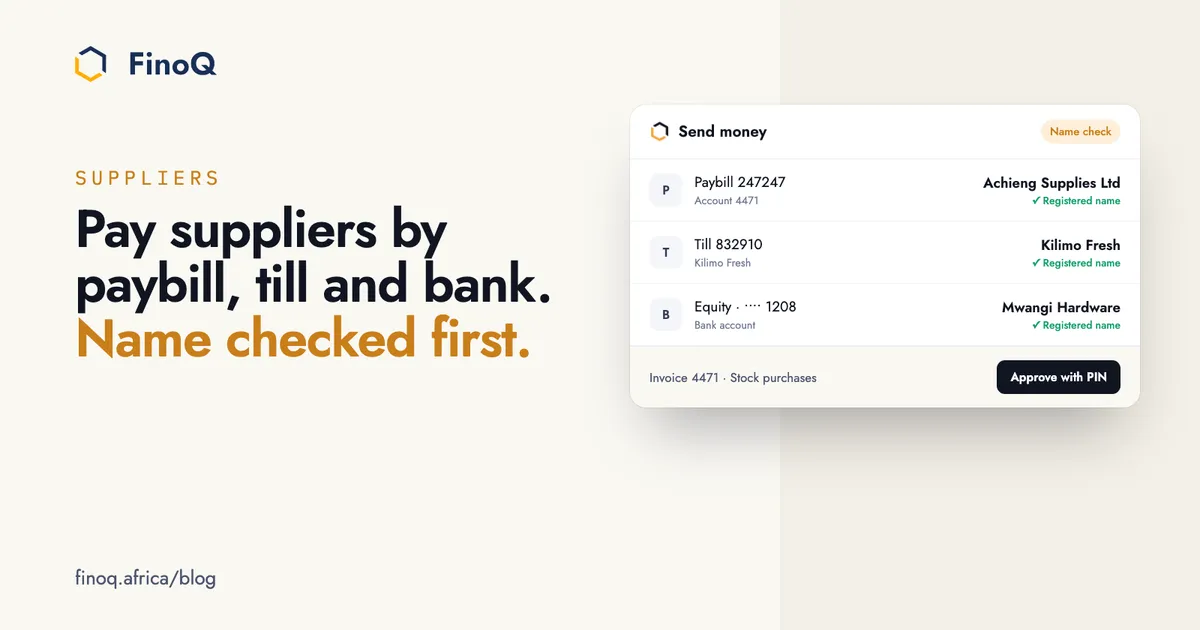
Open Send money, then choose how the supplier is paid:
- Paybill: the business number and the account number.
- Till: the till number.
- Bank account: the bank and the account number.
- Phone number: for small suppliers paid on M-Pesa.
Enter the amount, and FinoQ shows the registered name on that paybill, till or account before you approve. If you expected “Achieng Supplies Ltd” and the name says something else, stop there.
Approve with your PIN, and the payment goes.
Save suppliers you pay often
Add regular suppliers as beneficiaries, with every way you pay them: their paybill, their bank account, the owner’s phone. The next time, you pick the supplier and the account, and you do not retype a single digit. (Check the name before the money moves.)
Paying many suppliers at once
End of the month, with ten invoices due? Use Bulk payouts. One run can mix paybills, tills, bank accounts and phone numbers. Use the PAYBILL, TILL, BANK or MSISDN recipient type on each row.
Put the invoice number in the note and use a category such as Stock purchases or Rent. Then every line in your payouts list says what it paid for.
The record you will need later
Every supplier payment is kept in Payout transactions, with the date, amount, recipient, checked name and status. When a supplier says they were not paid, you can see what was sent, to whom, and when.
If you use Zoho Books, payments can be mirrored there, so your accountant sees the same record without retyping it.
Rules worth keeping
- Never change a supplier’s payment details from a message alone. Call them on a number you already have.
- Read the name check every time, even for suppliers you pay often.
- Put the invoice number on the payment. Future you will be grateful.
- Pay from a payout wallet, not from your collections. Your paybill and till keep doing their job, and a payouts problem never touches them.
Paying suppliers outside Kenya
For suppliers in other countries, choose International, pick the country, then mobile money or bank. The recipient’s name is checked first, and payouts are routed through regulated partners licensed in each market. Cross-border payouts are available once your business has completed the full verification tier. (Send to mobile money and banks across Africa.)
Getting started
Create a business account, verify your business for payouts, and pay your first supplier with the name on screen.