Invoices, payment links or checkout: which one should you send?
Three ways to get paid on FinoQ, and when to use each: invoices and quotes, payment links, and hosted checkout, all settling into the channel you pick.
FinoQ Team
Getting paid in Kenya is mostly solved. Customers know how to pay a paybill or a till. What is harder is the moment before they pay: sending them the right thing, for the right amount, in a way you can match up later.
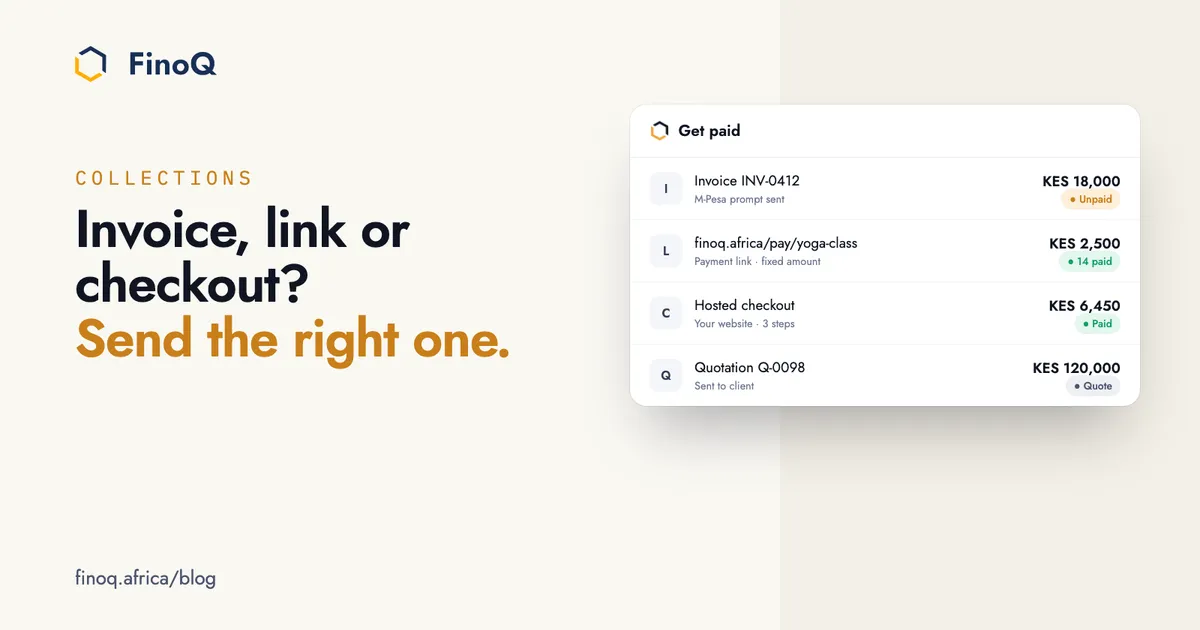
FinoQ gives you three ways to ask for money. Each one settles into the paybill, till or bank account you pick, and each is easier to match than “send to 0712… and share the message”.
1. Invoices and quotations
Use them when: you bill for work or goods, and the customer expects a document.
Create a quotation, turn it into an invoice when the customer agrees, and collect it by:
- an M-Pesa prompt (STK) sent straight to the customer’s phone, or
- an auto-generated link that closes once the invoice is paid.
Paid in cash, by bank transfer or by cheque? Record the payment against the invoice and attach the receipt. Every invoice then shows paid or unpaid, whichever way the money came.
Good for: contractors, agencies, wholesalers and service businesses.
2. Payment links
Use them when: you want to share one link on WhatsApp, Instagram or by SMS, and let people pay.
A payment link is a pay page with your logo and a custom name in the link. Set:
- a fixed amount (a KES 2,500 class) or an open amount (donations, top-ups),
- one-time use for a single customer, or reusable for many,
- an access code, if only certain people should be able to pay.
Good for: event tickets, classes, deposits, school fees and contributions.
3. Hosted checkout
Use it when: customers pay on your website or app.
Hosted checkout is a three-step pay page. The payer chooses a method, gives only the details that method needs, and pays. They do not need an account. Bursts of failing payment prompts are watched in real time and flagged or blocked automatically, so your checkout is not used to spam people.
Good for: online shops, booking pages and apps.
Which one, at a glance
| You want to… | Send |
|---|---|
| Bill a client for finished work | An invoice |
| Price a job before it starts | A quotation |
| Collect from many people with one link | A payment link |
| Take payment on your website | Hosted checkout |
| Get a specific customer to pay now | An M-Pesa prompt |
After the payment
Whichever way the money arrives, it lands in the channel you chose and shows up in one dashboard with everything else you collect. From there you can issue a KRA eTIMS receipt, mirror the payment into Zoho Books, and get a WhatsApp alert when money moves.
Getting started
Create a business account and connect the channel you already collect on. Your first payment link takes about a minute. See all payment features.