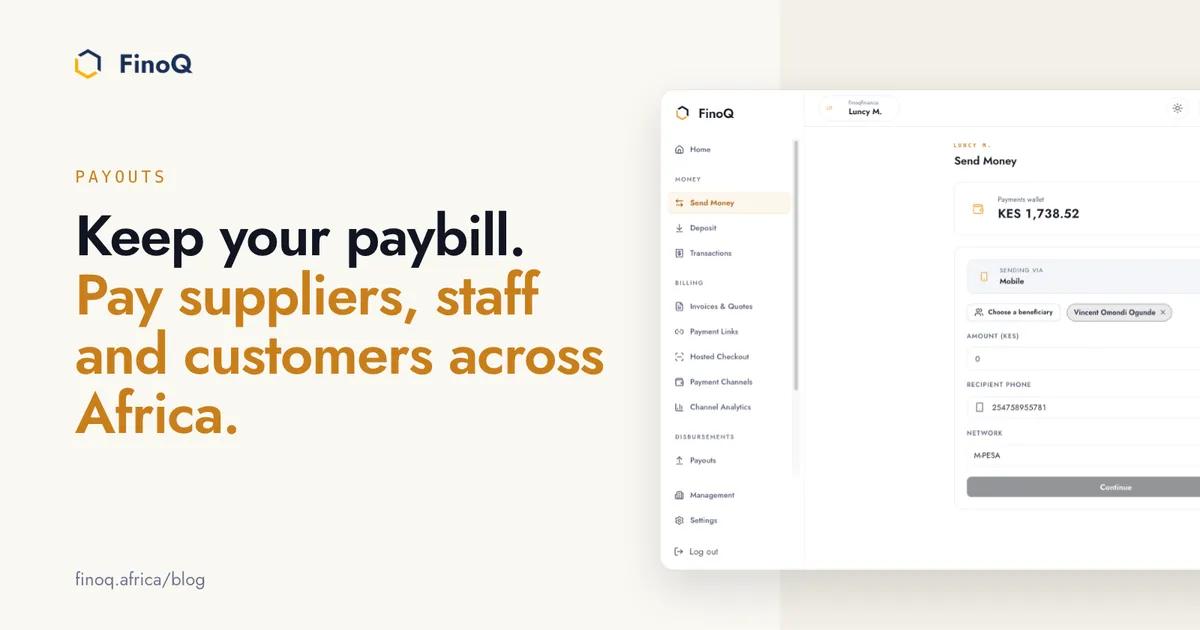
Keep your paybill. Pay suppliers, staff and customers across Africa.
How a small Kenyan business can pay vendors, refund customers and run salaries without moving its collections, with B2C and B2B payouts explained.
FinoQ Team
Ask a Kenyan small business how it gets paid and the answer is almost always the same: a Till, a Paybill, Pochi La Biashara, or a bank account. Customers know the number. It is on the receipts, the shop wall and the delivery rider’s phone. It works.
Then the business needs to send money. A supplier wants paying, a customer needs a refund, staff salaries are due on the 28th. And that is where things get hard.
Why paying out is the hard part
Receiving money in Kenya is easy to set up. Sending it out from a business, at volume and in a way you can account for, is not. The direct routes are built for large companies. Getting B2C or B2B access straight from a telco or bank means applications, documents, technical integration and minimum volumes that most small businesses never reach.
So the usual advice is: open an account with a payments provider that gives you a wallet, and run everything through it.
That works on paper. In practice it asks a lot.
- A full onboarding, again. Another round of KYB, director IDs, board resolutions and days or weeks of back and forth, on top of what your bank and telco already have.
- New ways for customers to pay you. Often the provider wants collections to come into their paybill or account so the money lands in the wallet. Every customer, every invoice and every printed receipt has to change.
- Their risk becomes your risk. If the provider has an outage, a dispute with a regulator, or shuts down, your collections and your payouts stop with it. You did not choose that risk. You inherited it.
For a business that already collects well, changing how customers pay just to be able to pay others is a big bet on someone else.
A different order of things
At FinoQ we started from the other end: keep collecting the way you do now, and add the ability to pay out next to it.
- Your collection channels stay yours. Connect the paybill, till or bank account you already use. Customers keep paying the same number. Money keeps landing where it lands today. FinoQ shows it all in one dashboard.
- A wallet for payouts, when you need one. Alongside your channels you get a payments wallet powered by regulated partners. You load it on demand, by M-Pesa prompt or by Paybill, with exactly what you want to send. Your collections are not rerouted to fill it.
- One verification, with us. You verify your business once with FinoQ. You do not sign up separately with each partner that moves the money behind the scenes. Verification is staged: you can start collecting into your own channels on day one, and add details as you need the wallet, higher limits or cross-border payouts.
If a payout partner has a bad day, the paybill your customers pay into is not affected. It is still your paybill.
B2C and B2B, in plain terms
We get asked this a lot, so here is the short version.
B2C (business to customer) is money from your business to a person’s phone number. M-Pesa, Airtel Money or T-Kash. Use it for:
- refunding a customer,
- paying casual workers, riders or agents,
- paying salaries to staff who are paid on mobile money,
- commissions, prizes and reimbursements.
B2B (business to business) is money from your business to another business’s paybill, till or bank account. Use it for:
- paying suppliers and vendors,
- rent and utilities to a landlord’s or company’s paybill,
- paying a contractor’s company account,
- staff salaries that go to bank accounts.
In FinoQ you do not need to know which one you are doing. You pick the recipient, a phone number, a paybill, a till or a bank account, and the payout goes the right way. Before you approve, the name on the number or account is checked, so you see who you are paying, not just digits. (More on that in Check the name before the money moves.)
What it looks like day to day
Paying one supplier
Open Send money, choose the paybill, till, bank account or phone number, enter the amount, check the verified name and approve with your PIN.
Refunding a customer
Same flow, to the customer’s phone number. The refund goes from your payments wallet, so your takings in the till stay where they are until you decide to move them.
Paying many people at once
Use Bulk payouts for salaries, agent commissions or a batch of suppliers. Build the list from saved contacts, a contact group, or a CSV or Excel file. One run can mix phone numbers, tills, paybills and bank accounts. Edit any row before sending, then confirm with a one-time code sent to your phone.
Paying across Africa
For suppliers and contractors outside Kenya, choose International, pick the country, then mobile money or bank. FinoQ shows the methods available in that country. Payouts are routed through regulated partners licensed in each market, and the recipient’s name is checked first. Cross-border payouts are available once your business has completed the full verification tier. Read more about paying across Africa.
Let the calendar do it: scheduled payouts
Salaries, rent and the security company are due on the same dates every month. Someone has to remember. With scheduled payouts, nobody does.
Turn any bulk payout into a schedule:
- Once, on a future date. A supplier payment due on the 5th.
- Daily, weekly or monthly. Salaries on the 28th, a weekly rider payout, a monthly rent run.
- With an end date or a set number of runs, for a fixed-term contract or a payment plan.
The recipients live on the schedule’s template. Add a new hire or remove a supplier any time, and the next run picks up the change. Each run keeps its own record, so you can always see exactly who was paid on which date, even after the list has changed.
A few things worth knowing:
- Schedules run in East Africa Time. A monthly run set for the 31st goes out on the last day of shorter months.
- The wallet balance is checked when the run fires, not when you set it up. Top up before the date and the run goes through.
- Bulk and scheduled payouts are for payouts within Kenya today.
Dashboard or API, same rules
Everything above works in the FinoQ dashboard. If you run your own system, a marketplace, a lending app, a school management tool, you can send payouts and check names through the API instead. Same wallet, same verification, same records.
Who this is for
- Shops and distributors paying suppliers without adding another app.
- Service businesses with staff, riders or contractors paid every week or month.
- Online sellers who need to refund customers quickly and keep a clean record of it.
- Growing teams that want payouts to run on a schedule instead of on someone’s memory.
Getting started
Create a business account, connect the channels you already collect on, and verify your business when you are ready to pay out. If you want to know which countries and payout methods your account can use, talk to us.
Keep getting paid the way you do. Pay everyone else from one place.